Signing up a new account

Welcome to TrackitHub! We have simplified the registration process by requiring each new user to register as a player first. You also can have multiple profiles associated with one email address.
If your spouse does not have their own email address or if you are an admin and would like to create a club account, you can use the same login credentials to access all your profiles.
The instructions below will assist you in registering your first player account. Thank you for choosing TrackitHub!
1. Go to https://www.trackithub.com
2. Click Login/Sign Up and select Sign Up
3. Enter your email address and a password. Passwords must be at least 8 characters long, with a minimum of one uppercase letter, lowercase letter, and number. Then, click "Next" to continue.
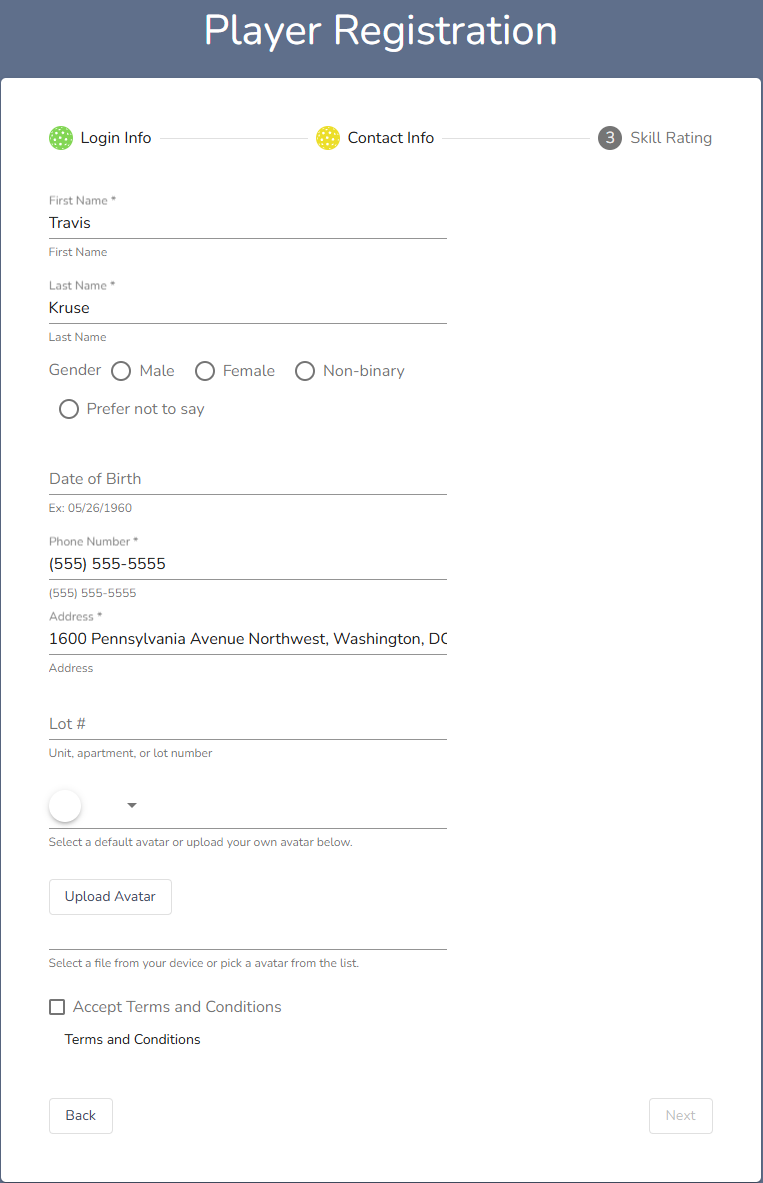
4. Enter your contact information. You can either choose a default avatar for your profile picture or upload your own. If any of the required fields are blank or improperly filled out, a yellow banner will appear at the top of the screen that will tell you what needs to be fixed. The mandatory fields are marked by an asterisk (*)
5. Choose your skill rating. If you do not know your skill rating, select No Rating.
6. Once all three forms have been completed, click "Finish".
To view more knowledge articles on the next steps in setting up your new TrackitHub account, click here.
Comments
0 comments
Please sign in to leave a comment.