New Feature Alert: Smarter Invites, Less Hassle!

We just rolled out a new Invite Settings menu inside your event editor - designed to save you time and streamline your event planning.
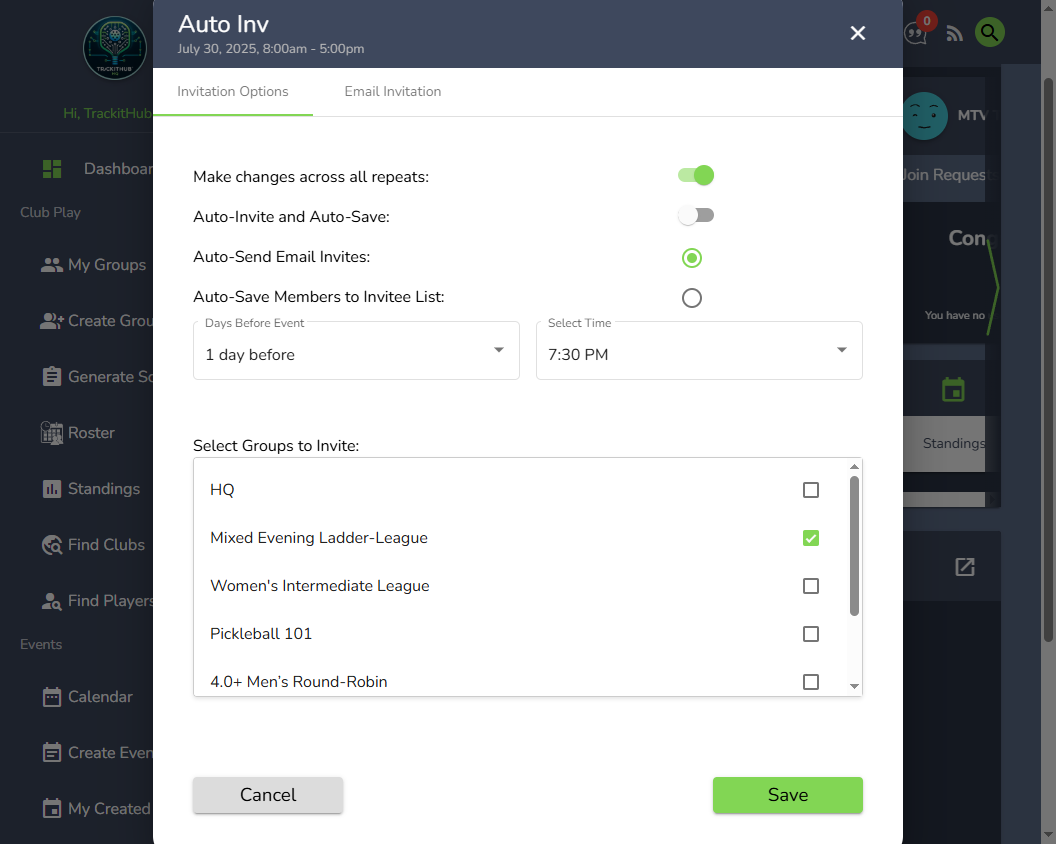
💡 Why this is awesome:
- Make changes across all repeats: Apply your invite settings to every instance of a repeating event with one toggle.
- Auto-Invite and Auto-Save: Turn on both the automatic generation of the invite list (based on the selected groups) and the sending of email invites to players on the saved list
- Auto-Send Email Invites & Auto-Save Members to Invitee List:
- Auto-Send Email Invites does just that, automatically sends out email invitations to the invitee list at the selected number of days before and time.
- Auto-Save Members to Invitee List does not send out email invitations but saves all players from the selected groups to the invitee list of instances of the repeat event
-
Only one of these choices can be picked for an event (you get both if you turn on the toggle for Auto-Invite and Auto-Save).
To try it out, open any event and head to the new Invite Settings menu via the Edit Event button (maybe change this to menu?).
For more detailed instructions, check out the new knowledge article [here].
We’re excited to keep making TrackitHub easier, faster, and more powerful for clubs like yours.
Thanks for being here!
The TrackitHub Team
Please sign in to leave a comment.
Comments
0 comments